Available Locations
Deploy your RDP closer to where your team or clients are.

London
United Kingdom

California
United States
Texas
United States
Virginia
United States
High-performance Windows Remote Desktop (RDP) servers hosted in Bangladesh and international locations. Fast, reliable, and affordable RDP for business and personal use.
Genuine licensed Windows Server, dedicated IP, and a 3 Gbps unmetered uplink, sized to fit anything from a single remote desktop to a busy automation rig.
Deploy your RDP closer to where your team or clients are.
Affordable RDP price, premium hardware, the most reliable RDP provider in BD.
Remote Desktop Protocol (RDP) lets you see and use a Windows desktop from anywhere, your keyboard and mouse are shared with the remote machine, so you can work on the server as if you were sitting right in front of it. To make the connection you only need two things: an RDP server (we handle that for you) and an RDP client on your local computer.
Looking for the best RDP in Bangladesh? ServerBD is one of the country's most trusted RDP providers, businesses, traders, and freelancers rely on us for stable, fast, and reliable Windows RDP connections backed by genuine licensed Windows Server, full admin access, DDoS protection, and a 24/7 local support team.
Three quick steps from purchase to a working remote desktop. Click any step to view its details.
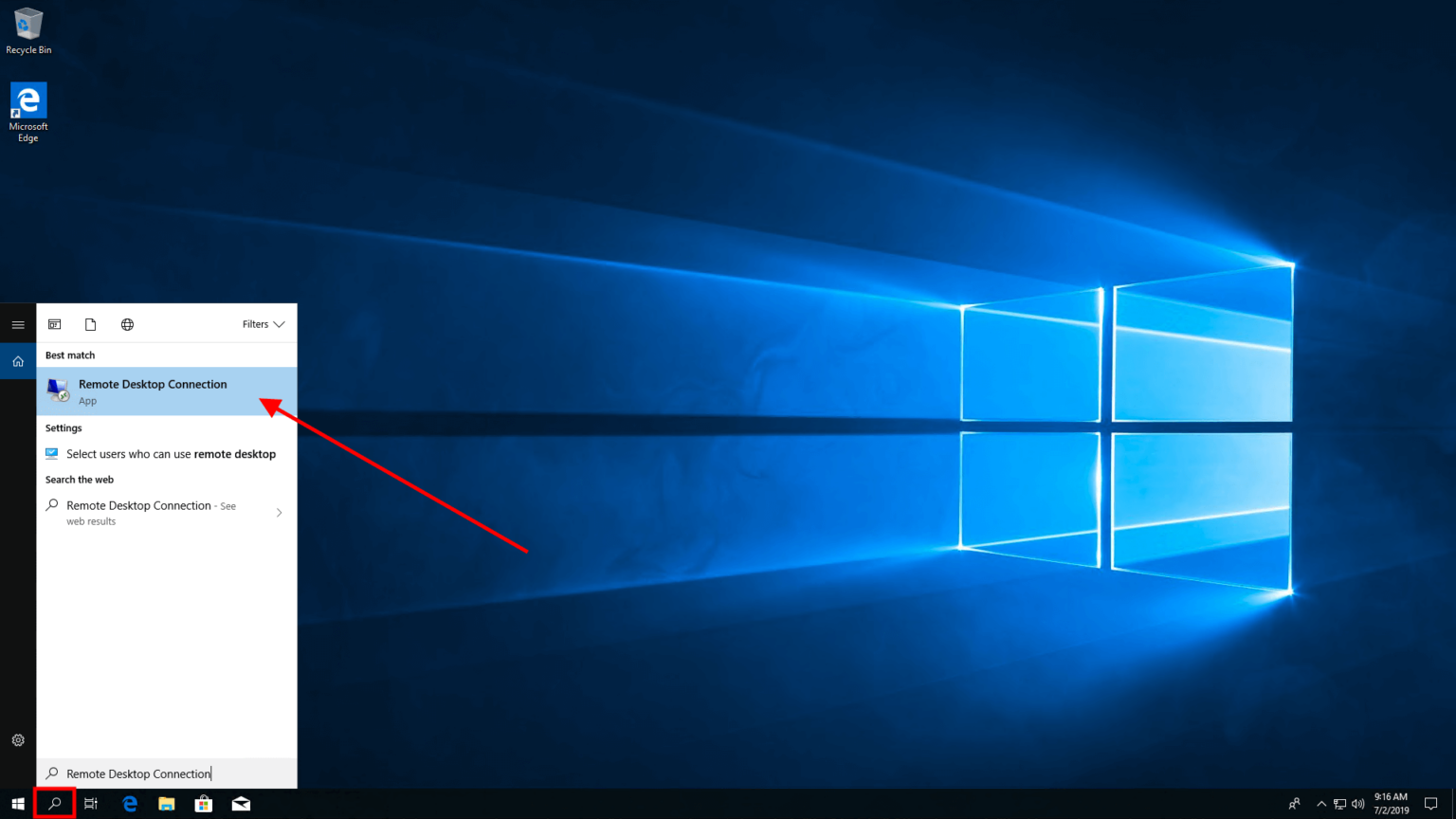
Click on the search bar at the bottom-left of your Windows 10 taskbar and type Remote Desktop Connection.
From the search results, click the Remote Desktop Connection app to launch it.
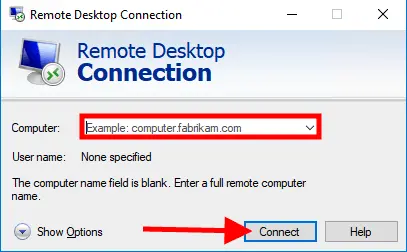
In the Computer field, enter the hostname or IP address of your RDP server (provided in your welcome email after order completion).
Once entered, click the Connect button to begin the connection.
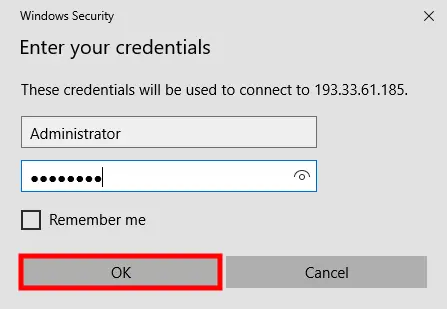
A Windows Security prompt will appear. Enter the Administrator username and password we sent in your welcome email.
Click OK, your remote Windows desktop will load and you're in. That's it!
Everything you need to run Windows in the cloud, high-bandwidth network, genuine licensing, full control, and round-the-clock local support.
Premium upstream from tier-1 carriers, stream, transfer, and run network-heavy tools without bottlenecks.
Authentic Microsoft-licensed Windows Server 2019 / 2022, secure, fully patched, audit-ready.
Administrator credentials from day one, install any Windows software, tweak any setting, total control.
Boot Windows in seconds and run apps without lag, enterprise-grade NVMe drives on every plan.
A clean, static IPv4 of your own, no neighbours, perfect for whitelisting, automation, and SaaS APIs.
Always-on network-level mitigation absorbs volumetric attacks before they ever touch your server.
From checkout to login in minutes, your RDP is auto-provisioned and credentials emailed the moment payment clears.
Bangladesh-based support engineers reachable round the clock via ticket, live chat, WhatsApp, or phone.
RDP (Remote Desktop Protocol) allows you to connect to and control a Windows computer remotely from anywhere in the world.
Yes, you have full admin access so you can install and run any compatible Windows software.
Yes, all RDP connections use TLS encryption. We recommend using a strong password and enabling Network Level Authentication.
Our Bangladesh-based RDP servers are connected to a high-speed network with BDIX peering for fast local connections.
Windows RDP in Bangladesh is a remote desktop service from ServerBD that lets you access a Windows server from any device, perfect for running Windows apps, automation tools and forex trading from anywhere in Bangladesh.
ServerBD Windows RDP price in Bangladesh starts at ৳1,500 per month with 2 GB RAM, 50 GB SSD and 100 Mbps shared bandwidth, the cheapest fully-managed Windows RDP price in Bangladesh.
Buy cheap Windows RDP in Bangladesh from ServerBD starting at ৳1,500/month, pay with bKash, Nagad, Rocket or card, instant activation and 24/7 Bangla support.
Yes, ServerBD accepts bKash, Nagad, Rocket, BRAC Bank, BEFTN, Visa, MasterCard and PayPal for Windows RDP purchases in Bangladesh, with instant activation on bKash transactions.
Yes, every ServerBD Windows RDP plan in Bangladesh comes with full administrator access, install any software, change settings, run scripts and customize the Windows server as you wish.
ServerBD Windows RDP in Bangladesh runs Windows Server 2019 or Windows Server 2022 by default, with Windows 10 and Windows 11 RDP available on request for special use cases.
Yes, ServerBD Windows RDP in Bangladesh is widely used for MT4, MT5, cTrader, NinjaTrader and other forex trading platforms, low-latency Bangladesh-friendly routes give you fast trade execution.
Yes, ServerBD high-RAM Windows RDP plans in Bangladesh handle Adobe Premiere, DaVinci Resolve and Final Cut light tasks comfortably, choose 16 GB RAM tier or higher for smooth 4K editing.
Yes, with full admin access on ServerBD Windows RDP in Bangladesh you can install AutoCAD, SolidWorks, MATLAB, Tally ERP, QuickBooks and any other Windows software supported by your license.
Standard Windows RDP plans in Bangladesh allow 2 concurrent users, multi-user RDP licenses up to 25 users are available as add-ons, suitable for Bangladeshi teams sharing a single Windows server.
Most ServerBD Windows RDP plans in Bangladesh include 1 to 5 TB monthly bandwidth on 100 Mbps to 1 Gbps shared lines, ideal for heavy data transfer, automation and web scraping use cases.
Yes, ServerBD Windows RDP in Bangladesh is popular for SEO tools like ScrapeBox, GSA Search Engine Ranker, Hrefer and headless Chrome scraping, with rotating IP add-ons available.
ServerBD Windows RDP in Bangladesh delivers sub-100 ms ping for Bangladeshi users thanks to BDIX-peered upstream and Singapore/EU nodes, choose the closest location for the fastest desktop experience.
ServerBD offers a 1-hour test session of Windows RDP in Bangladesh on request via WhatsApp, plus a 7-day money-back guarantee on monthly plans if performance doesn't meet your needs.
Yes, every ServerBD Windows RDP plan in Bangladesh includes free basic DDoS protection up to 10 Gbps, with premium 100 Gbps protection available as an add-on for enterprise customers.
Yes, every ServerBD Windows RDP plan in Bangladesh comes with a free dedicated IPv4 address, additional IPs are available as paid add-ons for multi-IP scraping or proxy use cases.
ServerBD Windows RDP in Bangladesh ships with a 99.9% uptime SLA backed by RAID-10 NVMe storage, redundant power and BDIX upstream, the highest uptime for Windows RDP services in Bangladesh.
Yes, ServerBD lets you upgrade RAM, CPU, storage or bandwidth on Windows RDP in Bangladesh from the client area in minutes, with zero downtime and pro-rata billing.
ServerBD Windows RDP in Bangladesh is excellent for light gaming, cloud gaming and Roblox-style titles, for AAA gaming we recommend dedicated GPU RDP nodes available on request.
Yes, ServerBD Windows RDP in Bangladesh runs Telegram Desktop, WhatsApp Web, Skype, Zoom and any other messaging or VoIP app smoothly, perfect for keeping accounts logged in 24/7.
Yes, ServerBD provides 24/7 Windows RDP support in Bangla and English via WhatsApp, phone, live chat and ticket, our local engineers help with setup, optimization and troubleshooting.
Yes, ServerBD Windows RDP plans in Bangladesh support running multiple browsers simultaneously, ideal for SEO, social media management, online auctions and dropshipping workflows.
Yes, ServerBD Windows RDP in Bangladesh comes with a 7-day money-back guarantee, refunded to your bKash, Nagad or bank account if you're not satisfied with the performance.
Use the free Microsoft Remote Desktop app on Mac, enter the IP, username and password ServerBD emailed after activation in Bangladesh, instant access to your Windows RDP from macOS.
Yes, ServerBD Windows RDP in Bangladesh is widely used for AdsPower, Multilogin, ProfileLock, ZennoPoster and custom automation scripts, with multi-IP and proxy add-ons available.
Yes, ServerBD Windows RDP in Bangladesh supports multi-monitor RDP via the standard Windows Remote Desktop client, ideal for trading, design and productivity workflows.
ServerBD Windows RDP in Bangladesh is pre-installed with Windows and ready to use instantly, VPS in Bangladesh is a bare-OS server where you install everything yourself, RDP is easier for non-technical users.
ServerBD Windows RDP in Bangladesh is not suitable for crypto mining as our terms prohibit mining workloads, for crypto-related dApps or wallets we recommend our Bangladesh VPS or dedicated server plans instead.
Install the free Microsoft Remote Desktop app from Google Play, add a new PC, enter the IP, username and password emailed by ServerBD in Bangladesh, instant Windows RDP access from your Android phone or tablet.
ServerBD Windows RDP nodes for Bangladesh users are hosted in Singapore, Hong Kong, India, UK, USA and Germany, choose the closest location at checkout for the lowest ping from Bangladesh.
Yes, ServerBD offers high-RAM Windows RDP plans in Bangladesh with up to 64 GB RAM and 16 vCPU cores, perfect for video editing, multiple VMs, heavy automation and large CRM deployments.
Join 15,000+ businesses in Bangladesh who trust ServerBD. Get started with a plan that perfectly fits your budget and needs.